

Close Menu

    Subscribe to Updates

    Get the latest creative news from FooBar about art, design and business.

    What's Hot

    200+ Industry Experts, Including Toyota and Honda, to Share Insights at AUTOMOTIVE WORLD 2026 in Tokyo

    February 10, 2026

    Bharat Forge and Germany based Agile Robots sign MoU to advance AI led industrial automation

    February 10, 2026

    Aerotech announces the launch of its AGV-CPO CORE Performance 2-Axis Laser Scan Head

    February 10, 2026
    Facebook X (Twitter) Instagram
    • About Us
    • Contact US
    • Advertise
    • Subscribe Magazine
    Publications Media Kit
    Facebook Instagram YouTube LinkedIn WhatsApp X (Twitter)
    Machine Tools World | Machine Tools Industry News | CNC Machine Manufacturers | Indian Manufacturing MagazineMachine Tools World | Machine Tools Industry News | CNC Machine Manufacturers | Indian Manufacturing Magazine
    • Top Stories
    • People in Focus
      • Interview
      • Opinion
      • Inside Story
    • Digital Edition
    • Tech Innovations
      • Aerospace / Defense
      • Allied
      • Automation
      • CAD / CAM
      • CNC
      • Cutting Tools
      • DIE / Mould
      • EDM
      • Grinding
      • Metrology
      • Metalworking fluid
    • Case Studies
    • Demo Room
    • Industry
      • Product Updates
      • News Updates
    • Special Zone
      • Cutting Tools Zone
      • Metalworking Fluid Zone
      • Metal Cutting Zone
      • Modern Metrology Zone
      • Smart Automation Zone
    • Blog
    Machine Tools World | Machine Tools Industry News | CNC Machine Manufacturers | Indian Manufacturing MagazineMachine Tools World | Machine Tools Industry News | CNC Machine Manufacturers | Indian Manufacturing Magazine
    Home - CAD CAM Software - VISI – CAD/CAM for the Mold & Die Industries
    CAD CAM Software

    VISI – CAD/CAM for the Mold & Die Industries

    MTWBy MTWJune 27, 2019Updated:November 5, 2022No Comments32 Views
    Facebook Twitter Pinterest LinkedIn WhatsApp Reddit Tumblr Email
    Share
    Facebook Twitter LinkedIn Pinterest Email

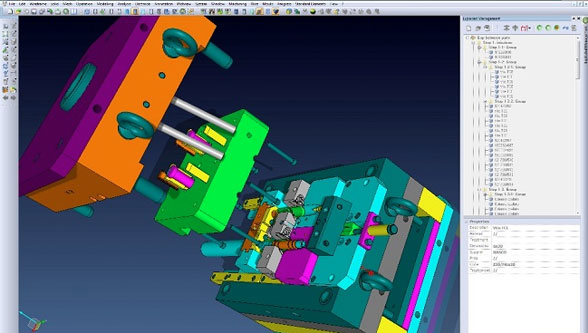
    VISI is acknowledged as one of the world’s leading PC based CAD CAM software solutions for the Mold & Die industries.

    It offers a unique combination of applications, fully integrated wireframe, surface and solid modelling, comprehensive 2D, 3D and 5 axis machining strategies with dedicated high-speed routines. Industry specific applications for plastic injection tool design including material flow analysis and progressive die design with step-by-step unfolding provide the toolmaker with unsurpassed levels of productivity.

    Hexagon offers dedicated solutions that eliminate the links between varying software suppliers and the solid-to-surface or CAD CAM geometry conversions required by traditional systems.

    VISI offers the following applications:

    VISI Modelling

    VISI Modelling is the foundation of all VISI products and provides a robust and powerful solid and surface modelling system based around the industry standard Parasolid kernel.

    [gap height=”20″]

    VISI Analysis

    VISI Analysis provides a suite of dedicated tools for the validation and preparation of model geometry. Finding problems at an early stage within the project life cycle is hugely beneficial.

    [gap height=”20″]

    VISI Mold

    VISI Mould provides the complete mold tool design solution based on industry specific automation that guides the user through the mold development process.

    [gap height=”20″]

    VISI Flow

    VISI Flow is a unique prediction tool, ideal for pre and postproduction analysis and concurrent engineering of injection moulded plastic components.

    [gap height=”20″]

    VISI Electrode

    VISI Electrode is an automated tool for the creation and management of electrodes, commonly used to manufacture hard to machine features on mold and press tools.

    [gap height=”20″]

    VISI Progress

    VISI Progress is an intuitive tool used for flat blank development, 3D strip layout and the design of progressive dies and press tools.

    [gap height=”20″]

    VISI Machining 2D

    VISI Machining 2D provides a practical, intuitive and simple application for CNC programming, ranging from 2D operations through to 4 and 5 axis indexing.

    [gap height=”20″]

    VISI Machining 3D

    VISI Machining 3D creates intelligent toolpaths on the most complex 3D data. Dedicated high speed milling techniques and built in smoothing algorithms create highly efficient and reliable NC code.
    [gap height=”20″]

    VISI 5 Axis Machining

    VISI 5 axis machining offers many advantages, and VISI Machining provides the operator with a productive solution for creating highly efficient toolpaths with advanced collision control.

    [gap height=”20″]

    VISI PEPS-Wire

    VISI PEPS-Wire incorporates the industry leading PEPS Wire EDM technology, developed specifically for the precision engineering & tool making industries.

    [gap height=”20″]

    VISI Blank

    VISI Blank is an integrated solution for the development of 2D blank shapes from complex 3D models for the sheet metal, progressive die, press tooling and crash tooling industries.

    [gap height=”20″]

    VISI Reverse

    VISI Reverse combines hybrid modelling CAD functionality with 3D scan data processing abilities to allow customers to create editable solid models starting from digitized/scanned data.


    Post Views: 530
    CAD CAM System Die and Mould
    Share. Facebook Twitter Pinterest LinkedIn Tumblr Telegram Email
    MTW

      Related Posts

      Takasu Seiki TSL-20 L07 — Precision Turning, Made for Modern Manufacturing

      November 26, 2025

      Rust Prevention in Manufacturing: Simple Tips to Protect Parts and Help Your Team Work Smarter

      October 31, 2025

      TSUGAMI M10J: High-Performance CNC Turning for Heavy-Duty Applications

      October 3, 2025
      Leave A Reply Cancel Reply

      Top Posts

      Machine Tools World August 2025

      August 25, 20252,462

      3D Printing: India’s Next Manufacturing Frontier

      June 14, 2025134

      Vertical and Horizontal Milling Machines: Key Points of Difference

      August 7, 2021180

      Gravity Die Casting and the Importance of Die Coats

      June 29, 202388
      Don't Miss
      Events

      Intralogistics & Warehousing Expo 2025 Pune – A Massive Success

      By MTWJune 9, 202545

      Pune, India- 3rd edition of Intralogistics & Warehousing Expo, co-located with the Material Handling Expo,…

      Countdown begins for AMTEX – First biggest face-to-face event on machine tools & metal cutting post lockdown

      March 17, 2021

      MMT Expo 2020 showcases world class manufacturing practices in its First Edition

      March 11, 2020

      Intech Additive Solutions

      February 24, 2020
      Stay In Touch
      • Facebook
      • Twitter
      • Pinterest
      • Instagram
      • YouTube
      • Vimeo

      Subscribe to Updates

      Get the latest creative news from SmartMag about art & design.

      About Us
      About Us

      MACHINE TOOLS WORLD magazine is a monthly machine tool industry magazine in India since from last 10 years, catering to Indian & global machine tools, CNC machine manufacturers, Cutting tools, Metal Forming Machine Manufacturers, CAD-CAM, Metrology, Lubricant, Grinding Machine Players.

      Facebook X (Twitter) Instagram YouTube LinkedIn WhatsApp
      Our Picks

      200+ Industry Experts, Including Toyota and Honda, to Share Insights at AUTOMOTIVE WORLD 2026 in Tokyo

      February 10, 2026

      Bharat Forge and Germany based Agile Robots sign MoU to advance AI led industrial automation

      February 10, 2026

      Aerotech announces the launch of its AGV-CPO CORE Performance 2-Axis Laser Scan Head

      February 10, 2026

      Subscribe to Updates

      Get the latest news, product insights, and expert opinions from the world of machine tools and manufacturing, delivered straight to your inbox.

      © 2026 MachineToolsWorld.
      • Terms & Conditions
      • Privacy Policy
      • Disclaimer Policy

      Type above and press Enter to search. Press Esc to cancel.